MailPoet for Gravity Forms

Simplify Your Gravity Forms and MailPoet Integration!

Connect the power of your MailPoet Newsletters with the ease of Gravity Forms powered forms.

MailPoet for Gravity Forms automatically captures your form entries for MailPoet, and provides a near-native integration that requires no code.

Screenshot of MailPoet Field Icon
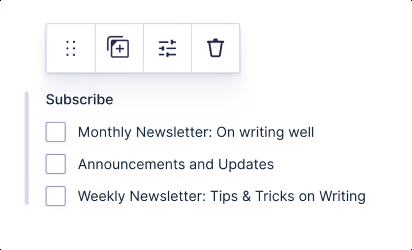
Screenshot of preview
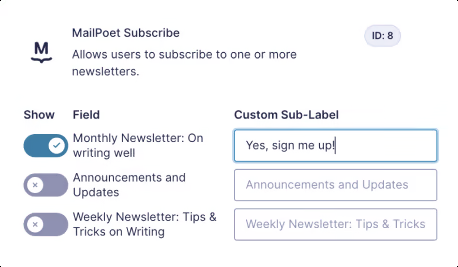
Screenshot of settings

Features

Everything you've ever wanted and more

We're determined to create the easiest ways of subscribing your users

See all planned features

Frequently Asked Questions

What would you like to know?

These are the most commonly asked questions about our plugin. Is your question not here? Ask us anything!

Does this plugin work with the free version of MailPoet?

Yes, our plugin works with both MailPoet Free and MailPoet Premium.

WordPress 5.0+, Gravity Forms 2.5+, and MailPoet 3.0+.

Yes! Use our bulk subscribe feature to import all existing Gravity Forms entries.

Yes, and it's incredibly easy! Unlike other plugins that require complex field mapping and feeds, our MailPoet Custom Field works differently.

  1. Create your custom field in MailPoet (radio, dropdown, etc.)
  2. Add our "MailPoet Custom Field" to your Gravity Form
  3. Select which MailPoet custom field to use

That's it! The field automatically uses the options and values from MailPoet.

No coding required. Simply drag and drop the MailPoet field into your forms.

Roadmap

Features we are working on and have planned

Have a suggestion? Please share it with us!

In progress

Sorting Newsletters on MailPoet Field

The ability to drag and drop the newsletter options in the desired order on the MailPoet Opt-in Field.

Finished

Configure custom fields

You can connect MailPoets custom fields to your form fields, in addition to First and Last Name.

Finished

Automatic Email Subscription

Instead of using the MailPoet Opt-in Field; configure existing Email fields to subscribe to selected newsletter lists.

Planned

Delayed Conditional Subscription

Processing the subscription after a certain conditional change; e.g. A payment status change.

Planned

Subscribe from Single Entry

Subscribe an email address straight from a metabox on the Single Entry Detail page.